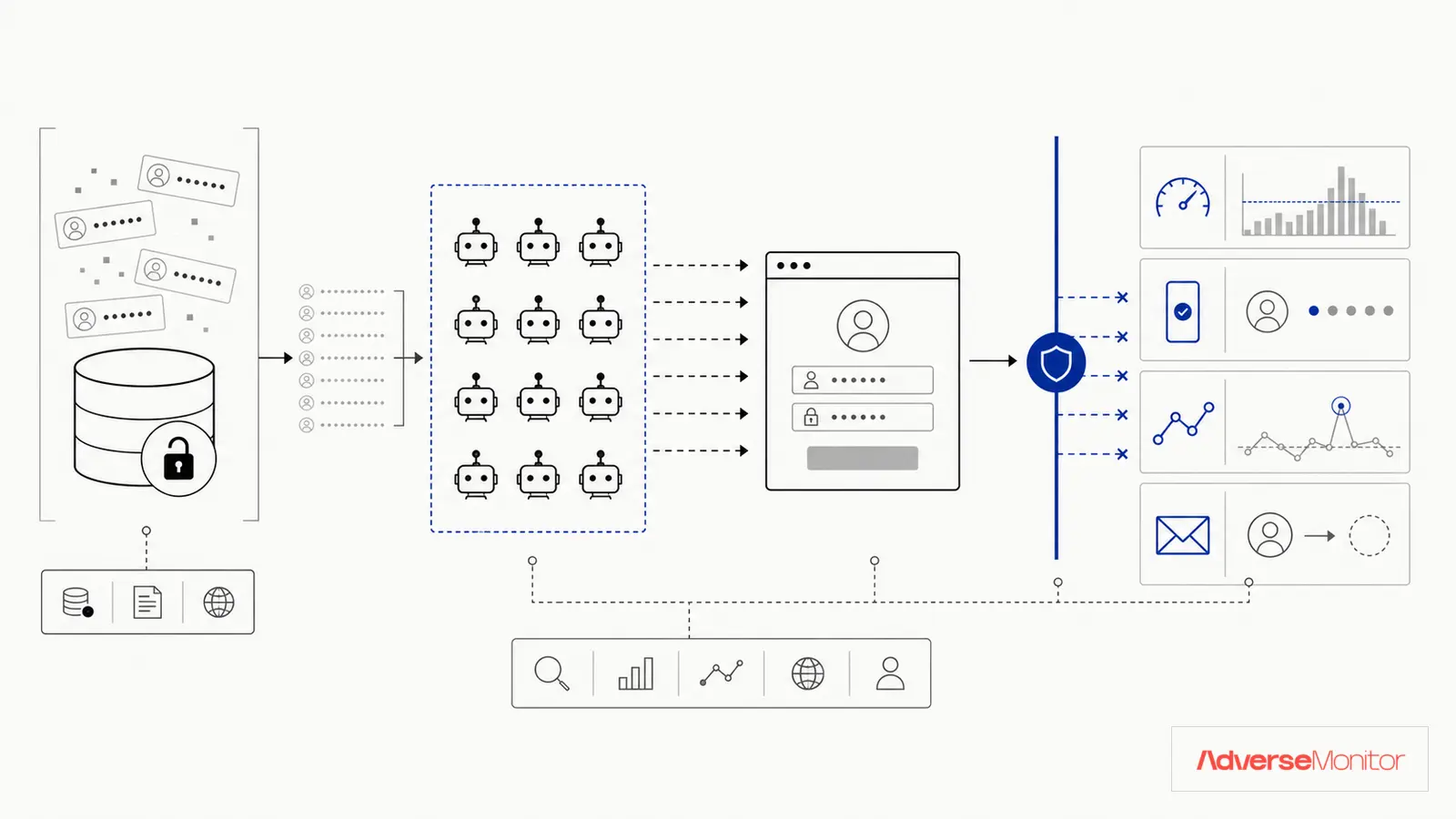
Attackers use lists of stolen username-password pairs to test accounts on other services. Password reuse turns a breach at one service into an access attempt at another.
Multi-factor authentication, rate limits, and breached-password checks address different stages of this attack. The sections below explain where each control fits.
What Is Credential Stuffing?
Credential stuffing is an automated cyberattack where attackers use lists of stolen username-password pairs to gain unauthorized access to user accounts. The attack exploits a simple human behavior: password reuse.
An attacker obtains credentials from a breach at one company, then uses automated tools to test them against other services. Password reuse creates the opportunity for a successful login.
Why It Works
The effectiveness of credential stuffing relies on several factors:
- Credential lists: Breach datasets and combo lists give attackers username-password pairs to test.
- Password reuse: A reused password may work on a service that was not part of the original breach.
- Automation: Bots can distribute login attempts across accounts, networks, and time windows.
- Detection is difficult: Sophisticated attacks distribute login attempts across multiple IP addresses and use residential proxies, making them look like legitimate traffic.
The Business Impact
A successful credential-stuffing campaign can create these business costs:
A successful credential-stuffing attack can create fraud, support, investigation, and recovery costs.
- Financial fraud: Unauthorized purchases, fund transfers, and loyalty point theft
- Data exfiltration: Access to sensitive customer or corporate data
- Reputation damage: Customer trust erosion when accounts are compromised
- Regulatory penalties: GDPR, CCPA, and other regulations hold companies accountable for account security
- Operational costs: Customer support overhead, fraud investigation, and incident response
How Attacks Are Launched
A credential-stuffing campaign usually follows these stages:
1. Credential Acquisition
Attackers source credentials from breach datasets, forums, paste sites, and criminal markets. A "combo list" packages username-password pairs for automated testing.
2. Target Selection
Attackers prioritize high-value targets: financial institutions, e-commerce sites, SaaS platforms, and any service where compromised accounts can be monetized.
3. Automation and Evasion
Using tools like Sentry MBA, SNIPR, or custom scripts, attackers automate login attempts while evading detection through:
- Rotating proxy networks (residential and mobile IPs)
- User-agent spoofing to mimic real browsers
- CAPTCHA-solving services (human or AI-based)
- Rate limiting by distributing attacks across time and IP addresses
- Browser fingerprint randomization
4. Account Validation and Monetization
After a successful login, an attacker may check stored payment methods, account balances, or accessible data, then use or resell the account.
Prevention Strategies That Work
Defending against credential stuffing requires a multi-layered approach. No single solution provides complete protection, but combining these strategies significantly reduces your risk:
1. Multi-Factor Authentication (MFA)
MFA can block a password-only login when the attacker lacks the required factor. Prioritize it according to the organization's identity and incident-response policy:
- Administrative and privileged accounts
- Customer accounts, especially those with financial or sensitive data
- Remote access and VPN connections
Implementation: Choose factors based on the threat model. Phishing-resistant methods avoid some interception and approval-fatigue risks that affect weaker factors.
2. Password Policies and Breach Detection
Implement password policies that discourage reuse and detect compromised credentials:
- Check passwords against breach databases (using services like Have I Been Pwned API)
- Enforce unique passwords (no reuse of previous passwords)
- Require password changes when credentials appear in public breaches
- Encourage password managers to generate and store unique passwords
3. Behavioral Analytics and Anomaly Detection
Monitor login patterns and flag anomalies:
- Impossible travel (login from New York, then Tokyo 10 minutes later)
- Unusual login times or devices
- Rapid-fire login attempts from single IP addresses
- High volume of failed login attempts
Some security platforms use machine learning to establish baseline behaviors and flag deviations for review.
4. Rate Limiting and Bot Detection
Implement technical controls to slow down or block automated attacks:
- Rate limiting: Limit login attempts per IP, per account, or per time window
- Progressive delays: Increase delay between login attempts after failures
- CAPTCHA challenges: Deploy CAPTCHA after suspicious patterns (but don't rely on it exclusively)
- Device fingerprinting: Identify and track devices used for login attempts
5. Dark Web Monitoring
External-source monitoring can surface a record for investigation. Verify the record against current accounts and authentication history before taking account action:
- Your domain's email addresses appearing in credential dumps
- Employee credentials for sale
- Customer data leaks
- Mentions of your organization in attack planning discussions
If the incident owner confirms that a current account is exposed, follow the established process for session revocation, credential reset, and user notification.
6. User Education
User guidance supports the technical controls. Cover these topics:
- The dangers of password reuse
- How to use password managers
- Recognizing phishing attempts that steal credentials
- The importance of MFA
Detecting Active Attacks
Even with prevention in place, you need to detect attacks in progress. Watch for these indicators:
- Spike in failed login attempts: Sudden increase in authentication failures
- Distributed login patterns: High volume of logins from geographically diverse locations
- User complaints: Customers reporting account lockouts or unusual activity
- Velocity anomalies: Rapid succession of login attempts across different accounts
- New device/location patterns: Many accounts accessed from previously unseen devices
Response and Recovery
If you detect a credential stuffing attack:
- Adjust rate limits: If the incident owner confirms automated abuse, apply the approved emergency policy without locking out legitimate users
- Enable challenges: Add friction where the observed traffic and accessibility requirements support it
- Block network indicators: Use time-bounded blocks when evidence ties traffic to abusive sources
- Reset affected credentials: Revoke sessions and reset credentials for accounts with verified exposure or unauthorized access
- Notify affected users: Follow the incident communications plan and applicable legal guidance
- Conduct post-incident analysis: Understand how attackers bypassed your defenses and improve controls
Stop Credential Stuffing Before It Starts
AdverseMonitor tracks publicly posted cyber-incident claims — ransomware and extortion leak-site posts, data-breach and data-leak listings, DDoS, defacement and initial-access offers — drawn from sources including Telegram channels, Tor sites and the open web, and raises a dashboard alert when your organisation, domain, industry or country is named. AdverseMonitor does not check whether a specific email address or credential was exposed.
Check a DomainMeasure the Controls
Credential stuffing attacks succeed because of a fundamental mismatch: attackers have industrial-scale automation, while many organizations still rely on reactive, manual defenses.
Layer MFA, rate limits, breached-password checks, and authentication monitoring. Test each control against legitimate traffic and known attack patterns.
Measure failed and successful login attempts, challenge rates, account resets, and confirmed takeovers. An external credential record can prompt a review, but internal authentication evidence determines whether an account was accessed.
Test how the team identifies a matching account, reviews login evidence, revokes sessions, and requires a new credential after a verified exposure.