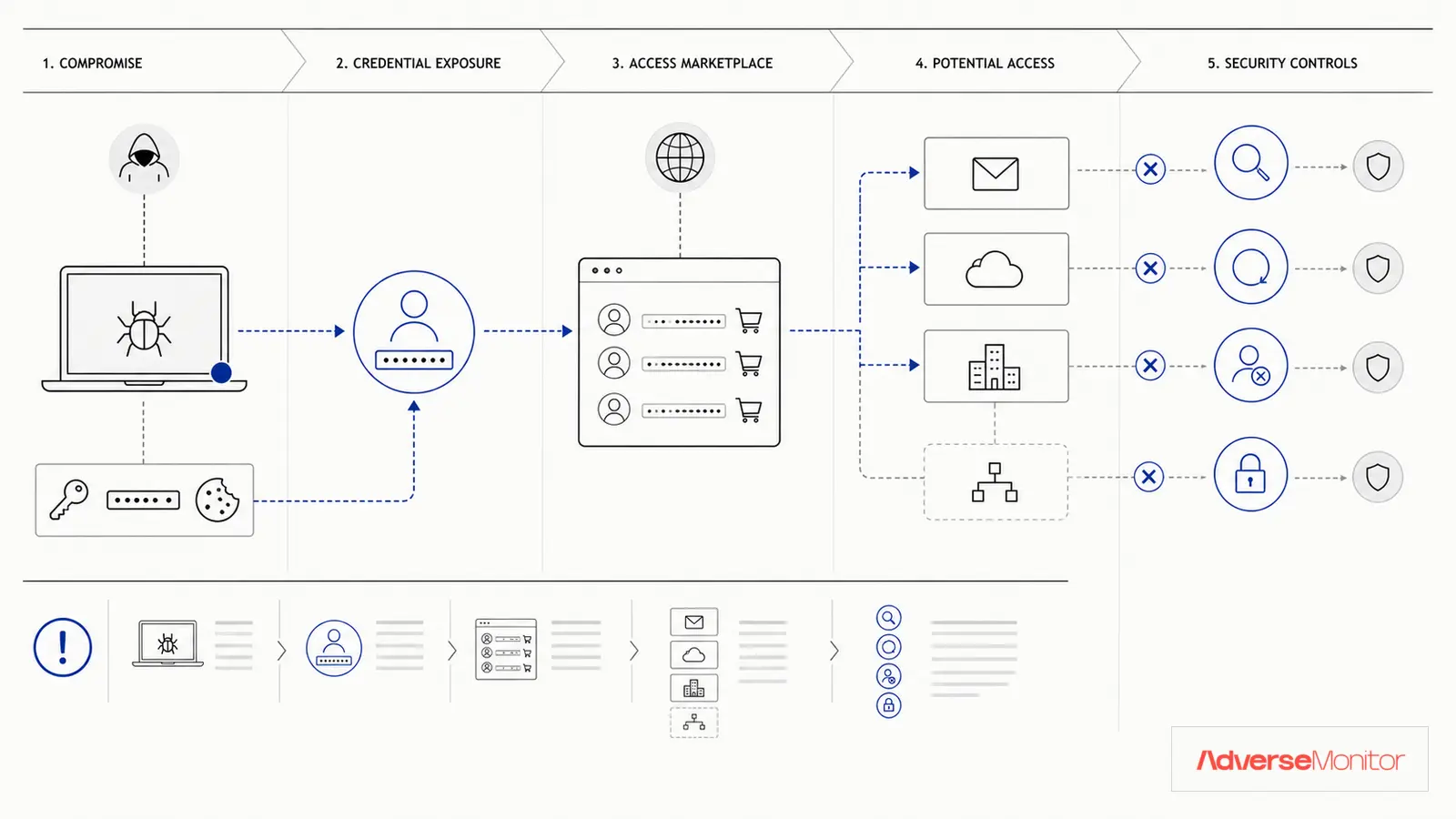
A stolen employee password may give an attacker a valid login path through email, VPN, or a cloud service. The risk increases when the employee reused the same password on a personal account that later appeared in a breach.
The response begins with identifying the affected account, checking whether the credential is current, and reviewing authentication history.
How Employee Credentials End Up on the Dark Web
Employee credentials leak through multiple channels:
1. Third-Party Breaches
Employees use streaming, shopping, social media, and forum accounts outside work. A breach at one of those services can expose an email address and password. An attacker may then try the same pair against corporate systems.
2. Phishing Attacks
A phishing page may imitate a familiar consumer service and capture submitted credentials. An attacker may then test or resell those credentials.
3. Malware and Information Stealers
Information-stealing malware can extract saved browser passwords from a personal device. Criminal sellers may package the captured data into logs for resale.
4. Corporate Breaches
Sometimes the corporate environment itself is breached, exposing employee credentials directly. These often appear on dark web forums or ransomware leak sites.
How Exposed Credentials Become Account Access
Employee credential exposure creates several attack vectors:
Initial Access
Compromised credentials let an attacker attempt a normal VPN or email login without exploiting a software vulnerability. This access can resemble an employee's activity, so authentication context matters.
Lateral Movement
Once inside with employee credentials, attackers move laterally across systems, escalating privileges and accessing sensitive data. The longer they remain undetected, the more damage they cause.
Business Email Compromise (BEC)
An attacker with access to employee email may impersonate an executive, request a wire transfer, or collect sensitive information.
Supply Chain Attacks
Employee credentials can provide access to vendor portals, partner systems, or client environments. A single compromised employee account can become a supply chain attack vector affecting multiple organizations.
Compare a relevant exposure record with current employee domains, account status, and authentication evidence before escalating it.
Hypothetical Risk Scenarios
These examples illustrate possible attack paths; they are not AdverseMonitor customer cases:
Scenario 1: The IT Administrator
An IT admin reuses a password across a personal account and a corporate VPN. If the personal account is breached, an attacker could try the exposed credential against the corporate network and gain an initial foothold.
Scenario 2: The Finance Employee
A finance employee's personal email is phished and the password is also used for corporate email. An attacker could monitor account traffic and attempt an impersonation or payment-fraud request.
Scenario 3: The Developer
A developer's GitHub credentials (used for personal projects) are exposed in a breach. They reused the password for the corporate code repository. An attacker could access proprietary source code and offer it for sale on a forum.
Detection Strategies
Use several sources to look for exposed accounts and suspicious authentication:
1. Dark Web Monitoring
Monitoring selected forums, paste sites, and breach sources can surface a record containing an employee email address. Validate the record and check the affected account before treating it as a confirmed compromise.
2. Threat Intelligence Feeds
Commercial threat feeds provide curated lists of compromised credentials. Cross-referencing these against your employee directory identifies at-risk accounts.
3. Have I Been Pwned Integration
Have I Been Pwned supports domain and account checks. Use it only under the organization's privacy, authorization, and employee-notification rules.
4. Behavioral Analytics
Monitor authentication logs for anomalies: logins from unusual locations, impossible travel scenarios, access patterns inconsistent with the user's role.
Response Playbook
When you discover compromised employee credentials:
Step 1: Verify the Threat
Confirm the credential is legitimate and assess its potential impact. Is it a current employee? What systems could be accessed?
Step 2: Reset a Verified Exposed Credential
Require the affected employee to change the password on relevant corporate systems and revoke active sessions. Handle the account through the incident process rather than waiting for a scheduled rotation.
Step 3: Check for Unauthorized Access
Review authentication logs for the affected account. Look for suspicious logins in the days or weeks before detection.
Step 4: Enhance Monitoring
Temporarily increase monitoring sensitivity for the affected account. Watch for any anomalous behavior.
Step 5: User Education
Explain which account was exposed and what the employee needs to change. Avoid blaming the employee while the investigation is still establishing how the exposure happened.
Prevention Measures
Reduce the risk of employee credential exposure:
1. Multi-Factor Authentication (MFA)
MFA blocks a password-only login when the attacker lacks the second factor. Prioritize VPN, email, administrative accounts, and cloud services.
2. Password Managers
Provide a password manager so employees can create a unique password for each work account without memorizing it.
3. Password Policy Enforcement
Implement password policies that discourage reuse and enforce complexity. Consider checking new passwords against known breach databases.
4. Zero Trust Architecture
Limit each authenticated account to the access its owner needs. Recheck sensitive actions and segment systems so one account cannot reach everything.
5. Regular Security Awareness Training
Educate employees about password reuse dangers, phishing recognition, and the importance of unique passwords for work accounts.
Review Credential Exposure Matches
AdverseMonitor tracks publicly posted cyber-incident claims — ransomware and extortion leak-site posts, data-breach and data-leak listings, DDoS, defacement and initial-access offers — drawn from sources including Telegram channels, Tor sites and the open web, and raises a dashboard alert when your organisation, domain, industry or country is named. AdverseMonitor does not check whether a specific email address or credential was exposed.
Check a DomainBuilding a Comprehensive Program
Set a schedule for credential checks, training, policy review, and monitoring. The security and privacy owners should approve the accounts checked, the lawful basis, employee notice, retention, and review frequency.
Set the Response Routine
Password reuse and large credential dumps create a recurring exposure risk for employee accounts.
MFA limits password-only access, while monitoring and authentication logs help the team identify accounts that need review.
When a matching record appears in a collected source, review the evidence and the account's authentication history. Reset the password and revoke sessions if the investigation confirms a current exposure.
Run a domain scan to see whether the available source evidence is relevant before choosing a monitoring plan.